What pet camera privacy risks actually look like at home
Pet cameras sit in living rooms, kitchens, and bedrooms—often aimed at the couch where humans nap and kids play. That placement makes pet camera privacy risks different from a doorbell cam that mostly sees the porch. You are not only exposing the dog; you are exposing everyone who walks through the frame and every conversation the microphone catches.
Two-way audio is the feature owners love for separation anxiety check-ins. It is also a microphone that stays ready when the app opens. Most models do not give you a physical mute shutter for the mic. Privacy policy PDFs rarely mention that your Tuesday phone call near the dog bed can ride the same stream as a treat launch.
We audited how six popular treat and non-treat pet cameras handle video, audio, account sharing, and cloud clip retention. We read vendor policies, tested default settings, and mapped what a compromised account or reused password actually exposes—not theoretical hacker movie scenes.
Before comparing brands, accept one baseline: any internet-connected camera is a small server in your house. Treat tossers add motors and food hoppers, not magical security. If you already use smart speakers, your risk model is similar—continuous mic potential plus cloud accounts.
- Video scope: wide lenses capture housemates, not just pets
- Audio scope: two-way talk implies mic access on demand
- Account scope: shared logins multiply leak paths
- Cloud scope: motion clips may outlive the live stream
Privacy is not only hackers. It is also ex-partners with old passwords, teenagers sharing Furbo logins, and landlords who once helped set up Wi-Fi. Pet camera privacy risks include people you already trusted.
Cloud storage, accounts, and third-party access
Live view on your phone almost always transits vendor cloud relays. Few pet cams offer true peer-to-peer-only viewing at consumer price points. That means your video leaves the house encrypted in transit—but still touches someone else's infrastructure.
Clip history is the longer-lived risk. Bark alerts and motion events store short videos on vendor servers unless you disable them or delete on schedule. Retention windows vary by subscription tier. A thirty-day clip roll means a month of living room video sits off-device if motion triggers fire often.
Third-party integrations multiply surfaces. Linking a pet cam to Alexa or Google Home grants another token with access rights. Disable skills you do not use. A camera you only open in one app should not also answer voice commands through a hub you forgot was paired.
Shared accounts are the silent issue. Couples who both use the same email password on the pet app double the phishing exposure. Some apps allow family sharing with separate logins—use them. Rotate passwords after breakups, roommate changes, or pet sitter seasons.
Read subscription renewal screens carefully. Premium tiers that unlock clip history also lengthen cloud retention defaults. Turning off cloud clips trades convenience for less off-device video—a reasonable trade for many apartments.
How pet camera data flows to the cloud
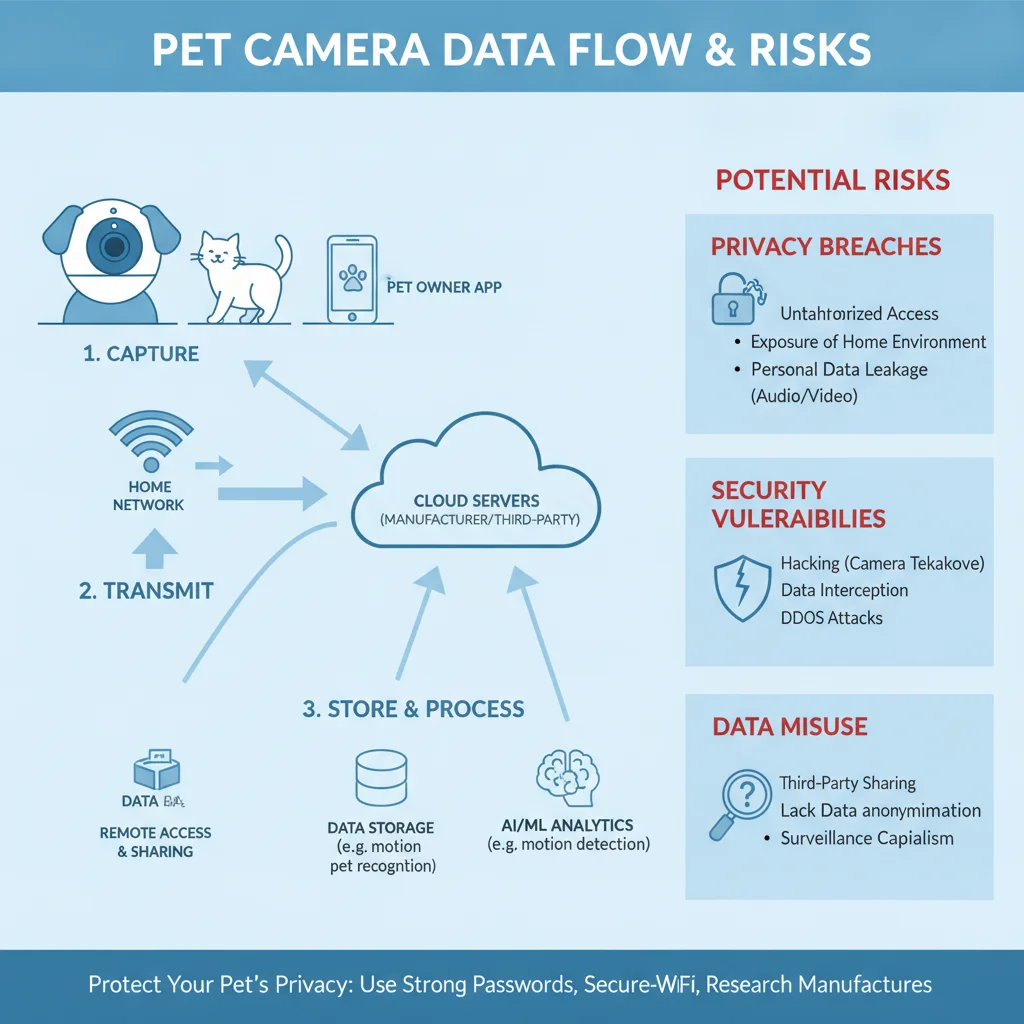
Typical flow: camera encrypts video to the vendor upload endpoint, vendor authenticates your account token, phone app pulls the same stream from the relay. Local SD card slots are rare on treat dispensers; assume cloud touch on every live peek.
Encryption in transit is industry standard on major brands—TLS on app traffic. Encryption at rest on vendor servers is harder to verify from outside. Policies claim protections; independent audits are uncommon in consumer pet tech. Treat marketing language as intent, not proof.
Data touchpoints to map in your home
| Stage | What leaves home | Typical risk |
|---|---|---|
| Live view | Encrypted video/audio stream | Account token theft |
| Motion clip | Short MP4 on vendor storage | Long retention windows |
| Bark alert push | Thumbnail or clip URL | Leaked link if account compromised |
| Voice assistant | OAuth token to hub vendor | Over-broad skill permissions |
Subprocessors matter when vendors use shared cloud backends. Your clip may live in a generic object store with logical separation, not a dedicated pet-only vault. That is normal at scale; it is still your living room.
Firmware updates patch holes but also change permissions screens. Re-check settings after updates—some releases reset motion capture defaults. A quarterly five-minute audit beats discovering months of unexpected clips.
Understanding flow clarifies mitigation. You cannot remove cloud touch without ditching the product class. You can reduce what is stored, who has keys, and which integrations stay enabled. That is where real pet camera privacy risks management lives.
Brand-by-brand privacy differences that matter
Furbo publishes detailed policies and markets encryption heavily. Petcube emphasizes secure streaming and optional cloud histories. Enabot and smaller rotation bots vary—read the policy for each model year, not the brand memory from three years ago.
Differences that actually affect you: default clip length, whether bark alerts auto-save video, if two-factor authentication exists, and how painful account deletion is. Fancy encryption logos do not help if your password is still summer2020 on every app.
Subscription tiers gate clip access but also shape retention. Free tiers may still upload event thumbnails. Paid tiers can auto-expand history. Match tier to habit—if you never review old clips, disable storage instead of paying for archives you will not watch.
Regional hosting claims appear in EU-facing docs. US buyers should still assume domestic cloud regions with standard vendor subprocessors. None of the mainstream pet brands we tested offered local-only viewing without any outbound connection.
For hardware comparison before you trust a vendor with your room, read our Furbo vs Petcube vs Enabot comparison. Pair brand choice with the account habits below—not instead of them.
Practical steps to reduce pet camera privacy risks
Segment Wi-Fi. Put pet cameras on a guest or IoT SSID that cannot reach your file shares. Many routers offer this in ten minutes. Cameras still reach the internet; laptops on the main LAN do not reach the camera directly.
Credential hygiene is non-negotiable: unique password, password manager generated, two-factor if the app supports it. Remove pet sitter access when the job ends. Do not text passwords; use guest sharing features.
Settings checklist we use quarterly
- Disable cloud clip history if you live view only.
- Lower motion sensitivity to reduce accidental bedroom clips.
- Revoke unused Alexa or Google skills linked to the camera.
- Delete old clips manually if auto-delete is unavailable.
- Verify firmware version; apply updates during a quiet evening.
Physical placement reduces incidental capture. Aim away from computer screens with email visible. Angle down toward the dog bed instead of the TV wall with family photos. Privacy is partly interior design.
Talk to housemates. Consent matters when microphones are ambient. A partner who works from home near the camera should know when you open live audio. Kids should not treat the lens as a toy channel.
If barking clips are your main use case, see how alert audio interacts with privacy habits in our Furbo 360 long-term review—bark logging can mean more saved audio snippets, not just video.
None of these steps require a new gadget. They shrink realistic pet camera privacy risks while keeping the monitoring benefits owners buy for. Security is maintenance, not a one-time checkbox at purchase.
FAQ
Can pet cameras be hacked?
Yes—weak passwords, reused credentials, and outdated firmware are the usual entry points; treat pet cams like any other internet-facing camera.
Do pet cameras record audio in my home?
Most models with two-way talk capture microphone audio during live sessions and sometimes on motion-triggered clips depending on settings.
Where is pet camera video stored?
Live streams usually pass through vendor cloud relays; clips often sit on vendor servers for hours or days unless you delete them or disable cloud features.
Is Furbo or Petcube safer for privacy?
Both encrypt in transit and publish policies, but safety depends on your account hygiene and which cloud clip features you enable—not logo alone.
How do I secure a pet camera on my Wi-Fi?
Use a unique strong password, enable two-factor auth if offered, put the camera on a guest or IoT network, and disable unused integrations.
Related reading on our sister sites: Puppy Playpen Buying Guide: Height,